Is It Safe to Put Your WiFi Password in a QR Code? A Privacy-First Guide
A WiFi QR code can make joining a network convenient, but it does not hide or encrypt the password. A compatible scanner can decode the network name and credential from the QR image. The generator's privacy matters because it determines whether your inputs also travel to a remote service before the code is created.
A WiFi QR code can save guests from typing a long password. That convenience creates two separate security questions: who can access the credentials after the QR code is shared, and whether the website that creates the code receives the credentials in the first place. This guide explains both questions, shows how to check a generator with test data, and describes the current limits of MatrixQR's WiFi implementation.
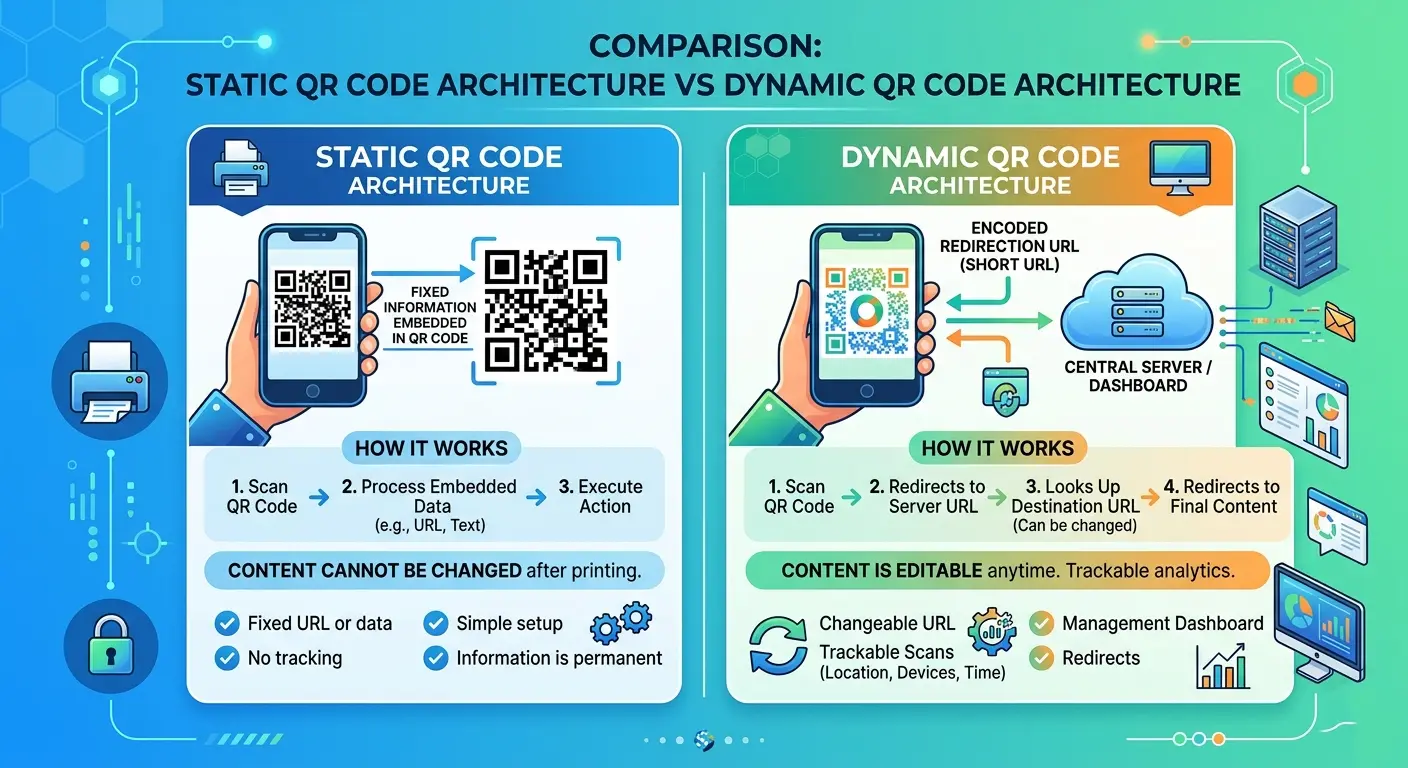
1. What information does a WiFi QR code contain?
A common WiFi QR payload uses a readable text format. A simple example is:
WIFI:T:WPA;S:MyNetwork;P:MyPassword;;In this format, T identifies the security-type token, S is the network name (SSID), and P is the password. Some implementations also recognize fields such as H for a hidden SSID and additional enterprise-network fields. The exact fields supported depend on the reader and the implementation. The ZXing Wi-Fi network format reference documents this commonly used syntax and its escaping rules.
Special characters in field values need escaping so that a semicolon is not mistaken for a field separator. The common format uses a backslash to escape reserved characters such as \, ;, ,, :, and ". For example, an SSID containing a semicolon must encode that character as \; rather than as a new field boundary. Correct escaping preserves the intended value when a compatible scanner parses the payload.
The QR symbol stores this payload as data. It does not automatically encrypt it, require a password to decode it, or restrict who can read it. Anyone with a clear image and a compatible QR reader can potentially recover the encoded fields. The WiFi password is therefore not secret merely because it is inside a square pattern.
2. Is it safe to put a WiFi password in a QR code?
It depends on where the code is displayed and who can obtain a copy. A QR code shown privately to a guest for a short time is different from one printed on a public sign, posted on social media, or included in a photo that can be forwarded indefinitely.
- Anyone can photograph it: A guest, visitor, passer-by, or camera in the room may capture the code.
- Copies are hard to control: Screenshots and photographs can be shared even after the original display is removed.
- There is no built-in expiry: A conventional static WiFi QR code does not revoke its own credentials when a meeting ends or a poster is taken down.
- Access may extend beyond the intended guest: If the code contains the main home or office network password, recipients may gain access to more than the internet connection you meant to share.
If a code containing your real network password has been posted publicly or shared beyond the intended audience, assume that the credential may have been copied. Remove the code where possible and rotate the password or disable the guest network when appropriate. Replacing the QR image alone does not invalidate the old password.
3. Client-side vs. server-side WiFi QR generation
The generator's architecture creates a different privacy risk from the QR image itself. A client-side generator constructs the WiFi payload and renders the QR code in the browser. A server-side generator sends some or all of the entered values to a remote endpoint for processing.
| Question | Client-side generation | Server-side generation |
|---|---|---|
| Where is the payload built? | In the browser on the user's device | On a remote service, or partly on the server |
| Does the generator backend need the password? | Not for a fully local generation path | Usually yes if the server creates the payload or image |
| Server log exposure | Can avoid sending the credential to a generation backend | Request bodies, application logs, diagnostics, or processors may expose it depending on implementation |
| What remains to review? | Page scripts, third-party code, browser extensions, and other network activity | Transport security, server access, retention, logs, processors, and deletion policies |
HTTPS protects data while it travels between the browser and a website, but it does not prevent the receiving server from reading data that the application sends to it. If a generator's backend receives the WiFi password, the operator must be trusted to handle it appropriately. Client-side generation can remove that particular transfer from the generation path, but it does not make the QR payload confidential after it has been created.
4. How to check whether a generator uploads your WiFi password
You can perform a practical browser check without exposing your real network credentials. Use unique dummy values that you have never used on an actual network. For example, use a made-up SSID such as QR-AUDIT-ONLY-7F3 and a fake password such as NotARealPassword-7F3!.
- Open Developer Tools before loading the generator. In Chrome or Edge, press
F12orCtrl+Shift+I, then select the Network panel. - Start with a clean capture. Clear the request list, enable Preserve log, and enable Disable cache while DevTools is open. Reload the generator so the initial page requests are recorded.
- Enter only the fake credentials. Generate the WiFi QR code and note the time. Do not use a real SSID or password for this test.
- Inspect the requests triggered by generation. Review Fetch/XHR and then All. Check request URLs, query strings, request payloads, form data, and relevant WebSocket messages for the unique dummy values. A request can be present without containing the credentials, so inspect its contents rather than counting requests alone.
- Repeat the action. Clear or mark the request list, generate another code with a different fake value, and compare the network activity. Look for requests that occur specifically when the form is submitted or the QR is generated.
- Try an offline generation check. After the page and its required assets have fully loaded, select Offline in the Network throttling menu and generate another test code. If it still works, that is evidence the already-loaded generation path can run without a live connection. Restore the network setting afterwards.
Important limitation: A clean Network capture is useful evidence, not a mathematical proof that no data can ever leave the device. It only covers the actions, browser session, and network paths you observed. Review the page's source and dependencies too, and remember that browser extensions or compromised scripts can change what happens at runtime. An offline test also cannot prove what the application does when it is online; it only checks whether generation can proceed after the necessary resources are loaded.
Chrome's official Network panel documentation explains request recording, Preserve log, Disable cache, and offline emulation.
5. What MatrixQR currently does—and does not claim
MatrixQR's current WiFi generation code constructs the WIFI: payload in browser JavaScript and passes it to the browser-side QR rendering flow. The reviewed implementation does not call a MatrixQR generation API to build the WiFi payload. This reduces the need to transmit the entered SSID and password to a MatrixQR generation backend.
The current WiFi helper escapes reserved characters in SSID and password fields, rejects a missing or whitespace-only SSID, and preserves the entered leading and trailing spaces rather than silently trimming the credentials. The current implementation emits a fixed T:WPA field. It does not provide selectable WEP, nopass, hidden-network, enterprise, or WPA3/SAE-specific settings. Its hex-looking-value quoting heuristic applies to SSIDs; it is not a claim of complete scanner interoperability for every unusual password format. Do not interpret the fixed token as a guarantee that every router, scanner, or WPA3-only configuration will work.
The code and unit tests are useful evidence about the implementation, but they are not a substitute for checking the live site's Network activity or scanning the exported QR code with the devices you intend to support. A successful preview test also does not establish that a separate production-domain test has been completed. Test with a non-sensitive network before relying on the code for guests.
As with any browser application, the page still needs to load its HTML, stylesheets, JavaScript, and other resources. A Network panel may therefore show ordinary page-asset or third-party resource requests. Their presence alone does not show that the WiFi password was uploaded; inspect whether the unique test values appear in request URLs or bodies and whether generation triggers a credential-bearing request.
6. Safer ways to share WiFi access
- Use a guest network: Create a separate guest SSID rather than exposing the password for your primary home or office network. Where supported, enable client isolation and restrict access to internal devices.
- Limit where the QR code appears: Show it only to intended visitors, avoid public social posts, and remove temporary displays after use.
- Rotate credentials when necessary: If a code has escaped its intended audience, change the guest-network password or disable that guest network. A new QR code is only useful after the underlying credential changes.
- Share access through trusted device features: When available, use your operating system's built-in WiFi sharing flow with the recipient nearby instead of publishing a reusable image.
- Keep the network itself protected: Use the strongest security mode supported by your router and devices, install firmware updates, and avoid reusing the same password across networks.
- Test before distribution: Scan the final code with the target devices and confirm that it connects to the intended guest network—not a similarly named network.
Frequently asked questions
No. A conventional WiFi QR code encodes the network details in a format a compatible scanner can read. The QR symbol is not an encryption layer, so someone who can scan or decode a copy may recover the SSID and password.
Yes. A screenshot is still an image of the QR code. Anyone who obtains it may be able to scan or decode the credentials, so treat screenshots and photographs as copies of the secret.
No. It can reduce the risk of sending the credentials to a generator backend, but the QR payload remains readable. You should also review runtime network activity, dependencies, and how the finished code is shared.
It is safer to create a separate guest network with limited access. A public code can be copied and reused by people outside the group you intended to invite.
No universal compatibility claim is made. The current implementation emits a fixed T:WPA field and does not expose selectable WEP, nopass, hidden-network, enterprise, or WPA3/SAE-specific options. Test compatibility with your target devices and router using a non-sensitive network.
Conclusion
A WiFi QR code is convenient, but it should be treated as a shareable copy of the network credentials—not as an encrypted password container. Choose a generator that minimizes unnecessary data transfers, verify its behavior with dummy credentials and browser tools, and share a separate guest-network code only with the people who need it. If a QR image becomes public, assume the credentials may have been copied and rotate them when appropriate.
For a broader look at static QR code privacy and data-flow trade-offs, read the pros and cons of static QR codes and our guide to client-side processing and privacy boundaries. You can also explore the MatrixQR generator—and verify any WiFi workflow with your own test network before sharing.