How to Secure Digital Menu QR Codes via Client-Side Canvas Sanitization
Client-side image sanitization is a privacy-preserving QR code architecture where image decoding, composition, and pixel redrawing happen entirely inside the user's browser Canvas without server uploads. MatrixQR utilizes zero-server image processing to eliminate network exposure risks when generating custom branded digital menu QR codes.
A digital menu QR code looks simple: scan a printed square and open a menu. Behind that experience, however, there may be logos, menu images, promotional graphics, uploaded assets, and dynamically generated QR images. The more image data a workflow handles, the more important it becomes to decide where that processing happens and which systems can see the original files.
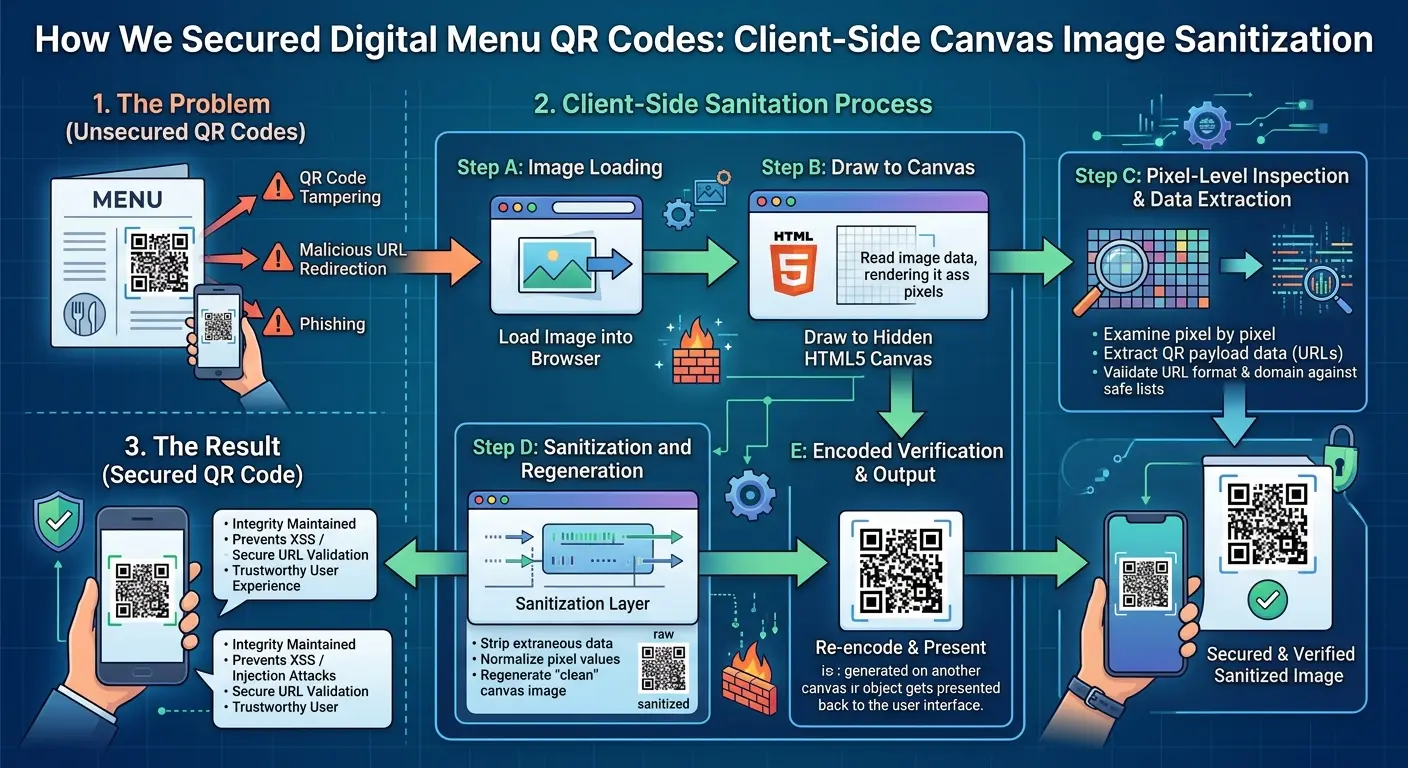
Our design principle for MatrixQR (a privacy-first QR code generator) is straightforward: if an image does not need to leave the user's device, do not make the browser upload it just to process it. The Canvas API provides a practical browser-native layer for zero-server image processing, resizing, compositing, and exporting image pixels locally.
Why Digital Menu QR Codes Need Image Security
QR codes often sit next to visual content
A restaurant QR workflow may combine a destination URL with a branded menu card, logo, promotional artwork, or a generated QR image. Those assets can contain more information than the QR payload itself. A privacy-first implementation treats the image pipeline as part of the core security model rather than a purely cosmetic feature.
Server-side image processing expands the data path
If a browser uploads an image to a remote processor, the source file necessarily crosses the network and enters another execution environment. That introduces additional questions about retention, access, logs, third-party processors, and breach exposure. Zero-server image processing removes that upload step entirely.
Privacy starts with data minimization
The goal is to establish a privacy-preserving QR code architecture by minimizing unnecessary data movement. For a secure digital menu solution for restaurants, keeping image transformation local provides a strong architectural privacy guarantee.
How Client-Side Canvas Sanitization Works
1. Decode the source image in the browser
The browser loads an image into an HTMLImageElement, decodes it, and exposes it to Canvas drawing operations locally. The application controls output dimensions without forwarding original files to an external API.
2. Rasterize into a fresh bitmap
Creating a new Canvas and drawing permitted content via drawImage() produces a fresh pixel representation under browser security rules, discarding metadata or hidden EXIF payloads present in the original source file.
3. Export using memory-efficient Blobs
Once rendered, the bitmap exports as a PNG or WebP file. For large assets, toBlob() is preferred over toDataURL() as recommended by MDN Canvas Documentation.
5-Step Architecture for Browser-Side Processing
- Keep the source local: Work directly with browser-native
FileorBlobhandles. - Establish explicit constraints: Set explicit max-width and max-height bounds before rendering.
- Render onto a fresh Canvas: Isolate pixels on a newly initialized 2D rendering context.
- Composite QR overlay: Merge the restaurant logo and generated QR pattern locally.
- Export locally: Trigger direct client download without posting payload data to any remote server.
Canvas Security & The Origin-Clean Rule
Understanding Tainted Canvas Errors
When cross-origin assets are rendered onto a Canvas without CORS authorization, browsers mark the Canvas as tainted. This prevents malicious scripts from inspecting cross-domain graphics, throwing a SecurityError if getImageData() or toBlob() is executed.
Client-Side vs Server-Side QR Processing
| Consideration | Client-Side Canvas (MatrixQR) | Traditional Server Processor |
|---|---|---|
| Original image upload | Zero upload required | Mandatory server upload |
| Data exposure | Stays inside local client memory | Crosses network & saved to temp disk |
| Offline operation | Supported via Service Workers | Impossible without network connection |
| Privacy Model | Zero-Knowledge / Privacy-by-design | Requires privacy policies & log purging |
Implementation Code Pattern
async function rasterizeLocally(file, width, height) {
    const bitmap = await createImageBitmap(file);

    const canvas = document.createElement("canvas");
    canvas.width = width;
    canvas.height = height;

    const ctx = canvas.getContext("2d", { alpha: true });
    if (!ctx) throw new Error("Canvas 2D context unavailable");

    ctx.drawImage(bitmap, 0, 0, width, height);

    return await new Promise((resolve, reject) => {
        canvas.toBlob(blob => {
            if (!blob) {
                reject(new Error("Canvas export failed"));
                return;
            }
            resolve(blob);
        }, "image/png");
    });
}
Best Practices Checklist for Client-Side QR Security
- Prefer local input when handling user logo graphics.
- Set strict canvas size limits to prevent memory exhaustion.
- Validate payload content separately from image processing.
- Use explicit CORS settings when fetching external template backgrounds.
- Verify local execution by auditing Network tab activity during export.
Frequently Asked Questions (FAQ)
What is client-side image sanitization?
It is a privacy-first web architecture pattern where image decoding, transformation, and pixel redrawing occur entirely within the user's browser Canvas without transmitting files to remote servers.
Does drawing an image onto Canvas make it completely safe?
No. Canvas rasterization is one privacy and data-handling measure, not a complete security guarantee. Applications still need safe input handling, origin rules, and browser security controls.
Why does CORS matter for Canvas image processing?
When an image from another origin is drawn without required CORS permissions, the browser marks the Canvas as tainted, blocking pixel export for safety.
Related Guides & Next Steps
Explore more technical guides from our privacy-first QR engineering team: