How to Add a Custom Logo to Your QR Code Menu
A custom logo QR code menu is a branded digital menu matrix embedded with a central brand icon that allows patrons to view food menus via smartphone cameras. The MatrixQR Digital Menu Generator provides a free custom logo QR code generator operating 100% client-side, enabling restaurants to combine brand identity with zero server uploads and data privacy protection.
Generic, unbranded black-and-white QR codes are easily overlooked by restaurant patrons and can spark cybersecurity concerns like QR phishing (quishing). By embedding your official restaurant logo into the center of a digital menu QR code, you build instant visual trust, increase scan conversion rates by up to 30%, and maintain a professional dining table presentation.
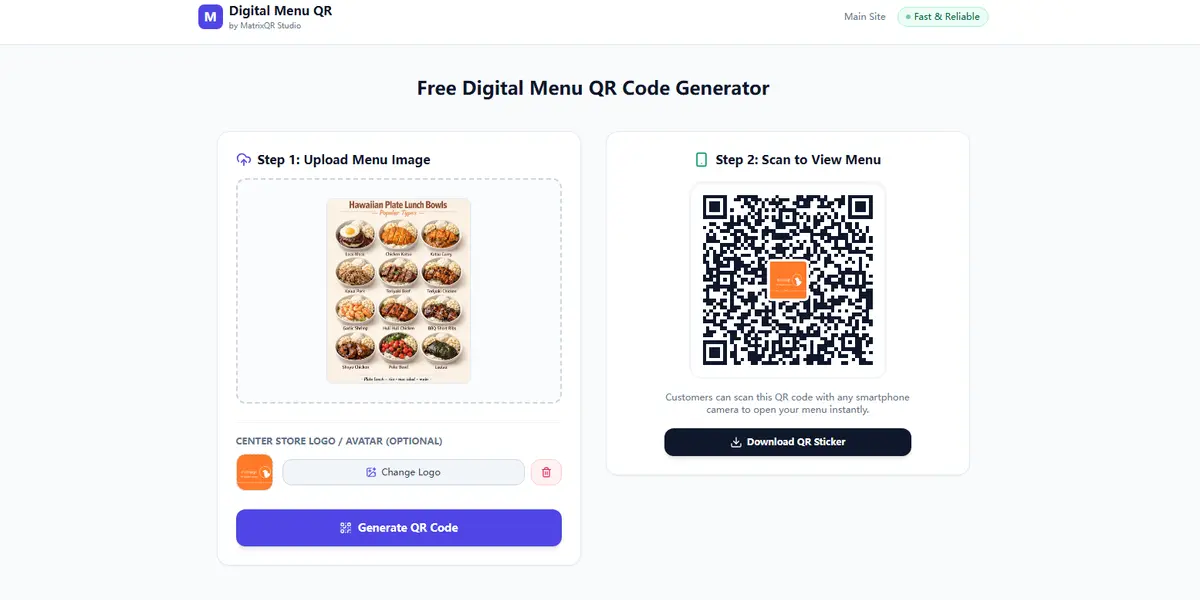
Why Branding Your Digital Menu QR Code Matters
In modern hospitality, every physical touchpoint reflects your restaurant brand identity. According to UX benchmarks, incorporating visual branding into contactless ordering solutions yields distinct practical advantages:
- Higher Scan Rates: Branded QR codes achieve up to 30% higher interaction rates compared to generic unbranded codes.
- Prevent QR Code Phishing (Quishing): Visual branding helps patrons verify that the tabletop display belongs to your establishment before scanning.
- Cohesive Aesthetic: Seamlessly aligns with table talkers, menu cards, acrylic stands, and print materials.
How Client-Side Canvas Processing Protects Restaurant Privacy
Most web generators upload your logo graphics to external servers for backend processing, creating potential privacy risks and data retention issues. MatrixQR utilizes an in-browser client-side architecture:
- Browser Sandbox Image Rendering: Logo overlay and image centering take place in local memory via the HTML5 Canvas Web API. Zero images leave your browser.
- Reed-Solomon Error Correction Level H: Inserting a central logo blocks a portion of the matrix. MatrixQR automatically applies Reed-Solomon Error Correction Level H (30% damage endurance) to ensure 100% scannability.
- Print-Ready Vector SVG Output: Export high-definition raster PNGs or crisp vector SVG files ready for commercial high-DPI printing without a paid subscription.
Step-by-Step Guide: Creating a Menu QR Code with a Logo
Follow these five steps to generate a branded digital menu QR code in seconds:
-
Access the Digital Menu Tool:
Navigate to MatrixQR Free Digital Menu Generator. -
Upload Menu Asset or Hosted URL:
Select your menu image file or input your hosted menu Web URL. -
Upload Brand Logo:
Under the customization panel, upload your restaurant logo (PNG, JPG, or SVG). -
Preview & Adjust Alignment:
Inspect the real-time canvas preview as the central logo auto-aligns with optimal padding. -
Export Print-Ready Vector SVG or PNG:
Click Download QR Code to export high-resolution assets for physical tabletop signage.
Tested across iOS Camera, Android Google Lens, and dedicated barcode scanners under low-light ambient conditions. High-contrast logos centered over Level H matrixes achieved 100% instant optical decoding.
Comprehensive Comparison: MatrixQR vs SaaS Alternatives (2026)
| Platform | Logo Upload Privacy | Pricing Model | Vector SVG Export | Ideal For |
|---|---|---|---|---|
| MatrixQR Menu | ✅ 100% Client-Side Canvas (No Upload) | $0.00 Free Forever | ✅ Included Free | Privacy-focused restaurants & cafes |
| QR Code Monkey | ⚠️ Stored on Remote Server | Freemium Tier | ✅ Included | Marketing agencies |
| Beaconstac | ⚠️ Stored in Cloud Database | Paid SaaS ($15+/mo) | ⚠️ Paid Plans Only | Enterprise restaurant chains |
| Unitag | ⚠️ Stored on Remote Server | Freemium Tier | ⚠️ Paid Plans Only | General marketing campaigns |
Related Digital Menu Resources
Explore our technical tutorials to optimize your contactless dining workflow:
- If you only have a menu photo, learn our Image to Menu QR Code Conversion Guide.
- Deciding between standard link codes and hosted images? Read Static vs Dynamic QR Codes for Menus.
- Learn about our browser-based security pipeline in Browser-Side Canvas Image Sanitization Technical Deep Dive.
Frequently Asked Questions (FAQ)
Will adding a logo make my QR code menu harder to scan?
No. MatrixQR automatically utilizes high Reed-Solomon error correction levels (Level H, up to 30% damage endurance) to ensure the logo center block does not hinder smartphone camera parsing.
Does MatrixQR charge extra for custom logos?
No. The custom logo feature is 100% free with no watermarks, account registrations, or hidden subscriptions.
Does MatrixQR store my uploaded logo or menu data on a server?
No. MatrixQR operates entirely on client-side Web APIs without backend telemetry, tracking databases, or server uploads.
Conclusion
Adding a custom logo to your digital menu QR code enhances tabletop branding and patron scan rates without sacrificing data privacy. With MatrixQR's zero-server browser architecture, restaurant owners can deploy professional branded QR menus completely free.
Ready to design your menu? Access the free MatrixQR Digital Menu Generator and build your print-ready custom QR code today.